How to test a new website before launch, without recruiting users
To test a new website before launch without recruiting users, send synthetic users through your staging site. Synthetic users are AI personas, built from your own customer research, that browse the site like real buyers and say where they get stuck. A run takes about 5 minutes, so you can test, fix and re-test before go-live.

On this page
- Pre-testing makes sense, so why do teams skip it before launch?
- What are synthetic users, and why do they suit website testing?
- How do you test a staging site with synthetic users?
- How about things like brand guidelines and claims?
- Example: how MIRON tested its new multilingual site
- What should you check before go-live?
- What doesn't a pre-launch test with synthetic users cover?
- FAQ
In short
- Test the journeys that make money, on the staging site, with the personas you already have.
- Give each persona a task, not a script, so you get natural browsing behavior. Run at least 20 personas, and at least 6 per segment.
- Look for what months of work made you blind to: untranslated third-party tools, missing features, pages with missing content, forms that ask for things buyers don't have.
- The team turns the findings into tickets for the agency or developers. Then re-test with the same personas, and let other teams reuse them after launch.
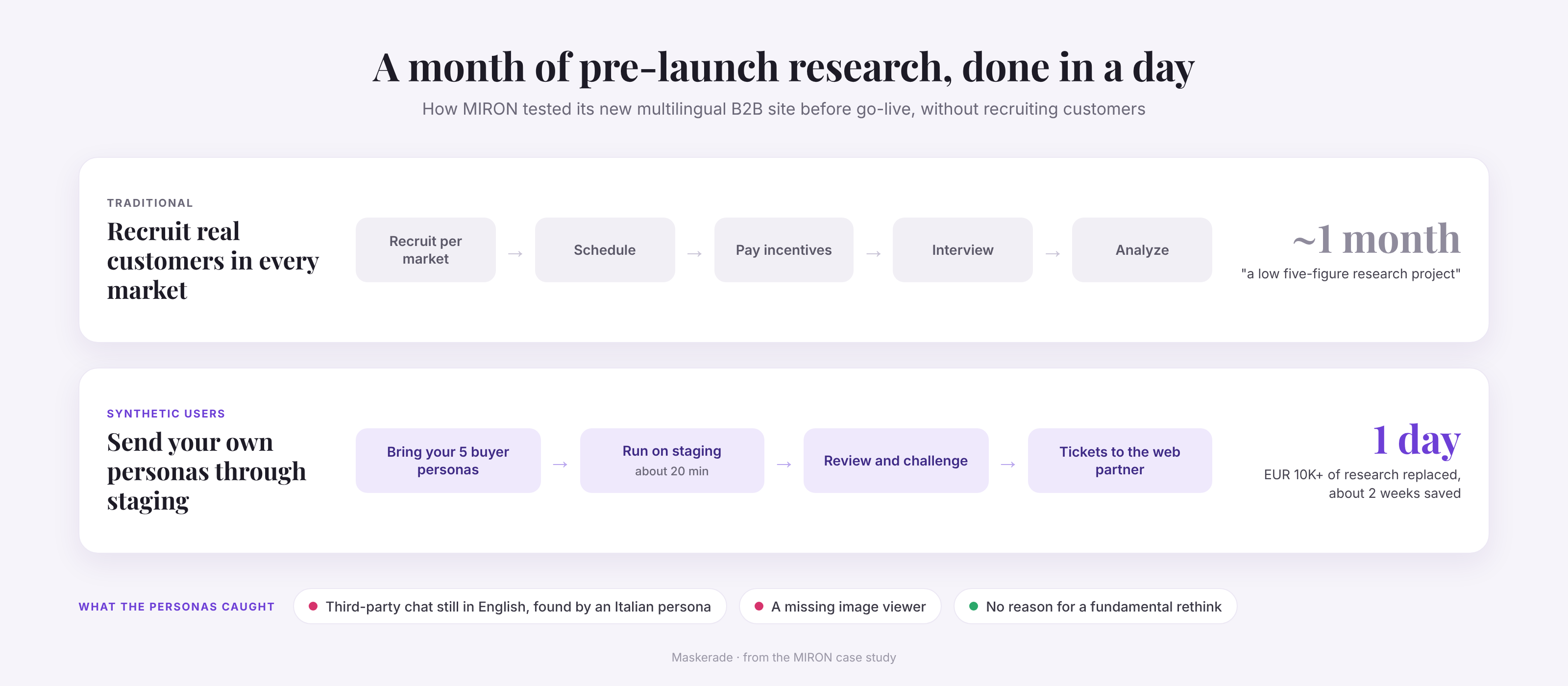
- MIRON tested its new multilingual B2B site this way: a month of research done in a day, and more than EUR 10K of traditional research replaced.
Pre-testing makes sense, so why do teams skip it before launch?
Those who have launched a new website in their career will know this all too well.
You know you should pre-test your site from all angles; from quality control to localization checks, from critical journeys to impact on the customer.
But recruiting real testers takes weeks, your customer isn't necessarily excited to help you test your marketing, and launch dates don't move. Or at least, they shouldn't. Recruiting, scheduling, paying and interviewing customers in every market is a project of its own. MIRON's Head of Marketing put it at "a low five-figure research project once you include recruitment, incentives, interviews, and analysis."
Skipping it carries a real risk: going live with a site that converts worse than the old one. And after months on a project, the team often stops seeing obvious gaps. In his words: "after working on a website for months you become blind to certain things."
Classic usability testing helps, but each round is small. Jakob Nielsen's well-known rule says 5 users find about 85% of usability problems, and that 3 small rounds beat one big one. But before a launch there rarely is time for 3 rounds of testing, and a team of 5 people can't cover every market and buyer type.
Synthetic users, also called AI personas or digital twins, could be a fantastic help for these exact issues.
What are synthetic users, and why do they suit website testing?
Synthetic users are AI personas that browse a real website the way your buyers would, and report where they get stuck, what they can't find and what puts them off.
- What they are. Each synthetic user stands for one buyer type: their role, goals, what they already know, what worries them, and the market and language they buy in. An AI agent takes on that profile and uses a real browser.
- How you make them. Start from the customer research you already have, such as buyer personas from the agency brief, interview notes or survey results. Each persona then gets a task, like "find the right product and request a quote". We explain the method in How we build synthetic users, and the research behind it.
- Why they're good at web testing. They click through the actual site, staging included, not a prototype or a questionnaire. They follow their own path, in every language you sell in, and every finding comes with the screen the persona saw.
You can re-test with the same personas after every fix, and you can brief personas to pay attention to very specific issues like brand guidelines.
How do you test a staging site with synthetic users?
Point the synthetic personas at the staging URL, give them a broad task and review what they report. Your synthetic users will browse like your ICP customer, and report exactly what you're missing to convince them.
Make changes, and do it again until what you're cooking up is perfectly seasoned.
Some practical tips:
- Pick the journeys that matter. Choose the 2 or 3 paths that bring in revenue or leads, such as product page to quote request. Start narrow: a quick scan of the key pages already finds things worth fixing.
- Start from the personas you already have. Most relaunches come with buyer personas from the agency brief. MIRON handed over five: founder, product manager, marketing manager, purchasing manager and creative director. Add a variant per market and language, ensuring they account for cultural sensitivities.
- Make the staging site reachable. Personas need a URL they can open. For logged-in areas, set up realistic test accounts, because odd accounts create findings real customers would never have.
- Give a task, not a script. "Find the right product for your business and request a quote" lets each persona find its own path. That shows where people get lost.
- Do a sample run with a few personas first. It catches a staging bug or a broken login before it wastes the full run.
- Run the full test. Use at least 20 personas, and at least 6 per segment, because each persona takes its own path and you need volume to cover the journeys. A run takes about 5 minutes, and every finding comes with the screen the persona saw.
- Turn findings into tickets, then re-test. The people who know the business review and challenge the findings, and pass the relevant ones to the agency or developers. After the fixes, run the same personas again, so any change comes from the site. Stop when no launch blockers remain. After launch, other teams can test campaigns and new pages against the same personas.
How about things like brand guidelines and claims?
Highly important, and another great use case for this technology.
Brief the personas with the rules that matter to you, and they check every page against them while they browse. A brand audit or a claims check then becomes part of the same pre-launch run, not a separate manual review at the end.
What you can brief them with:
- Brand guidelines. Tone of voice, terminology, how you name products, and what you never say. MIRON briefed its personas with its brand and tone-of-voice guidelines, and they flagged pages that broke MIRON's own rules.
- Claims rules. Which claims you may make, and what proof each one needs. Think of green claims such as "eco-friendly" or "climate neutral", which the EU's Empowering Consumers Directive restricts from September 2026, or health, price and "number one" claims.
- Market rules. What has to differ per country, such as legal notices, prices with or without VAT, or terms that don't translate one to one.
Keep the criteria specific. "Flag any environmental claim without proof on the same page" works better than "check for legal issues". Every finding shows the screen and the sentence, so the brand or legal team can decide quickly. It is a pre-check, not a sign-off: legal still has the last word, but it reviews a shortlist instead of the whole site.
Example: how MIRON tested its new multilingual site
MIRON Violetglass did a month of pre-launch research in a day. The company was launching a completely new B2B website in several languages, under tight time pressure. Dennis Griemink, Head of Marketing & E-commerce, wanted "speed, scale, and more objective feedback before going live", without recruiting customers.
MIRON's five buyer personas browsed the new site in each market's language. Personas briefed with MIRON's brand and tone-of-voice guidelines checked every page for consistency. Dennis reviewed the findings and turned the relevant ones into tickets for MIRON's web development partner.
The personas caught what the team had stopped seeing:
- A chat in the wrong language. "An Italian persona noticed that our on-site chat was still in English. Because the chat is a third-party layer, it wasn't even part of our normal localization scope."
- A missing feature. Another persona flagged a missing image-viewer function. "In hindsight, it was obvious."
- Sins against their own brand book. Personas briefed with MIRON's brand and tone-of-voice guidelines flagged pages that broke MIRON's own rules.
Just as important, nothing called for a fundamental rethink, such as a completely different product page, so MIRON could launch knowing no glaring mistakes were left.
The result: more than EUR 10K of traditional research replaced, and about two weeks of lead time saved. "Getting improvements live two weeks earlier also means two additional weeks of benefiting from better conversion," Dennis says. Since launch, time on site is going up, and MIRON is now measuring the effect on conversion.
What should you check before go-live?
Check the things a team stops seeing after months on a project. In client projects we find broken things in almost every run, such as pages with missing content, and flows that don't make sense, such as a form asking for information the visitor doesn't have.
| What to check | What synthetic users catch | Example |
|---|---|---|
| Every language and market | Text, tools and offers that weren't localized | MIRON's third-party chat, still in English |
| Key features | Functions buyers expect but can't find | MIRON's missing image viewer |
| Content mechanics | Empty sections, broken links, placeholder text | Pages with missing content |
| Content quality | Copy that doesn't convince: an unclear offer, jargon, claims without proof, questions left unanswered | A product page that lists features but never says why they matter to the buyer |
| Forms | Fields that ask for things visitors don't have | A form that needs a customer number before you are a customer |
| Brand and tone of voice | Pages that drift from the brand guidelines | MIRON's brand audit |
| The whole journey | Messages that clash between Google, a comparison site and your page | MIRON's personas starting from search |
| The money path | Where people hesitate on the way to buy or request a quote | Product page to quote request |
Run the checklist on mobile as well as desktop if most of your traffic is on phones.
What doesn't a pre-launch test with synthetic users cover?
It tells you what blocks or confuses buyers, not what your conversion rate will be. Keep these limits in mind:
- Conversion needs live traffic. Measure it after launch with analytics and A/B tests, as MIRON is doing now.
- Big bets still need real customers. In our own study, synthetic users found about 80% of a moderated focus group's core findings, with no contradictions, plus 40% more that other real people confirmed. That is enough to fix a site, and to stand in when there is no time to talk to customers, but not to replace every conversation with them.
- Personas only see what they can reach. Logged-in areas need test accounts, and anything outside the website, such as follow-up emails or sales calls, stays out of scope.
Thanks for reading. That's it for today. Hopefully this helps everyone out there trying to get a new site up and running!
Guillaume Derolez, co-founderTest your new site before it goes live
Maskerade runs AI personas that browse your website like real customers and tell you where they get stuck. Point them at your staging site before go-live and read their report about 5 minutes later.
Frequently asked questions
How long does it take to test a website before launch?
A run takes about 5 minutes. With review and tickets included, MIRON did in a day what would have taken a month of recruiting, interviews and analysis.
Can synthetic users test a staging site?
Yes, any URL the personas can open, including a staging site before go-live. For logged-in areas, give them realistic test accounts.
How many synthetic users do I need?
At least 20 personas per run, and at least 6 per segment. Each persona finds its own path, so you need volume to cover the journeys.
Do I still need real users?
For big decisions, yes. Synthetic users are fast enough to pre-test and re-test every release, and they can stand in when there is no time for real users, but for the biggest decisions a mix of methods works best: focus groups, one-to-one UX research, analytics data, A/B tests and synthetic users.
Can my agency work with the results?
Yes. Every finding comes with the screen the persona saw, so it turns into a ticket easily. MIRON passed its findings to its web partner as development tickets.
Keep reading
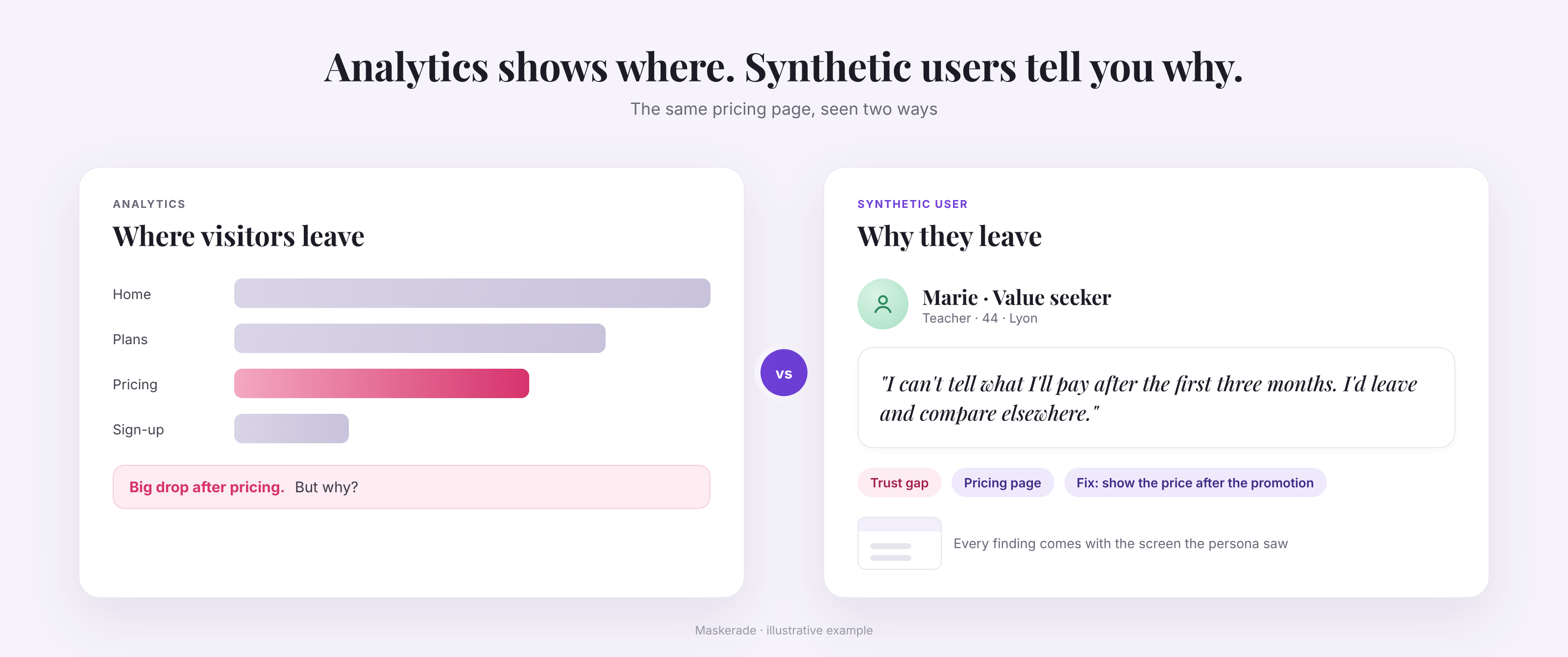
Synthetic users for website testing: how AI personas find what your analytics miss
Synthetic users are AI personas that browse your website like real customers. What they find that analytics miss, when to use them and how accurate they are.
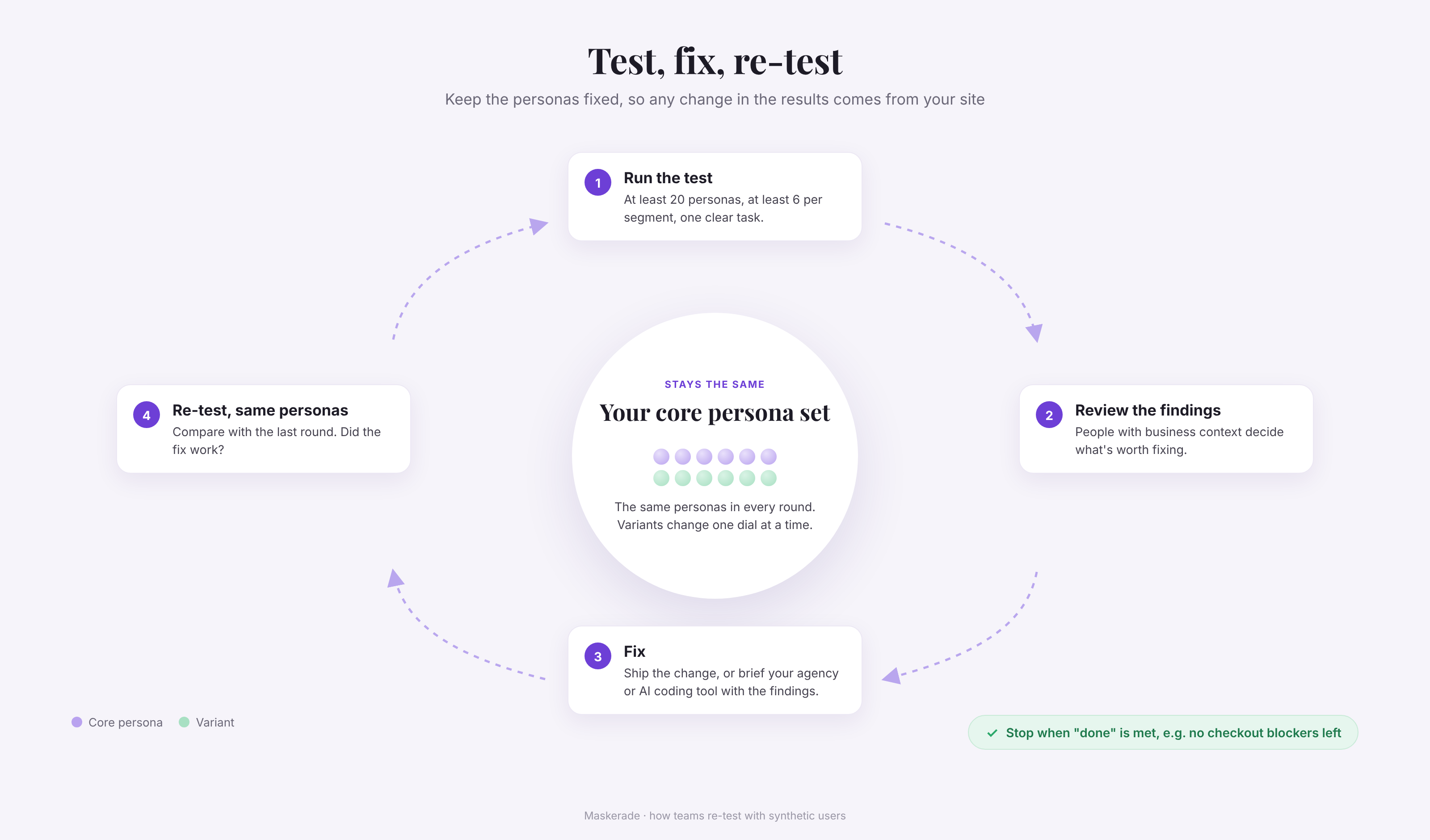
Synthetic users: 13 best practices from real customer projects
How to test your website with synthetic users: 13 best practices from ENGIE, MIRON and other customer projects, plus what our own accuracy study found.
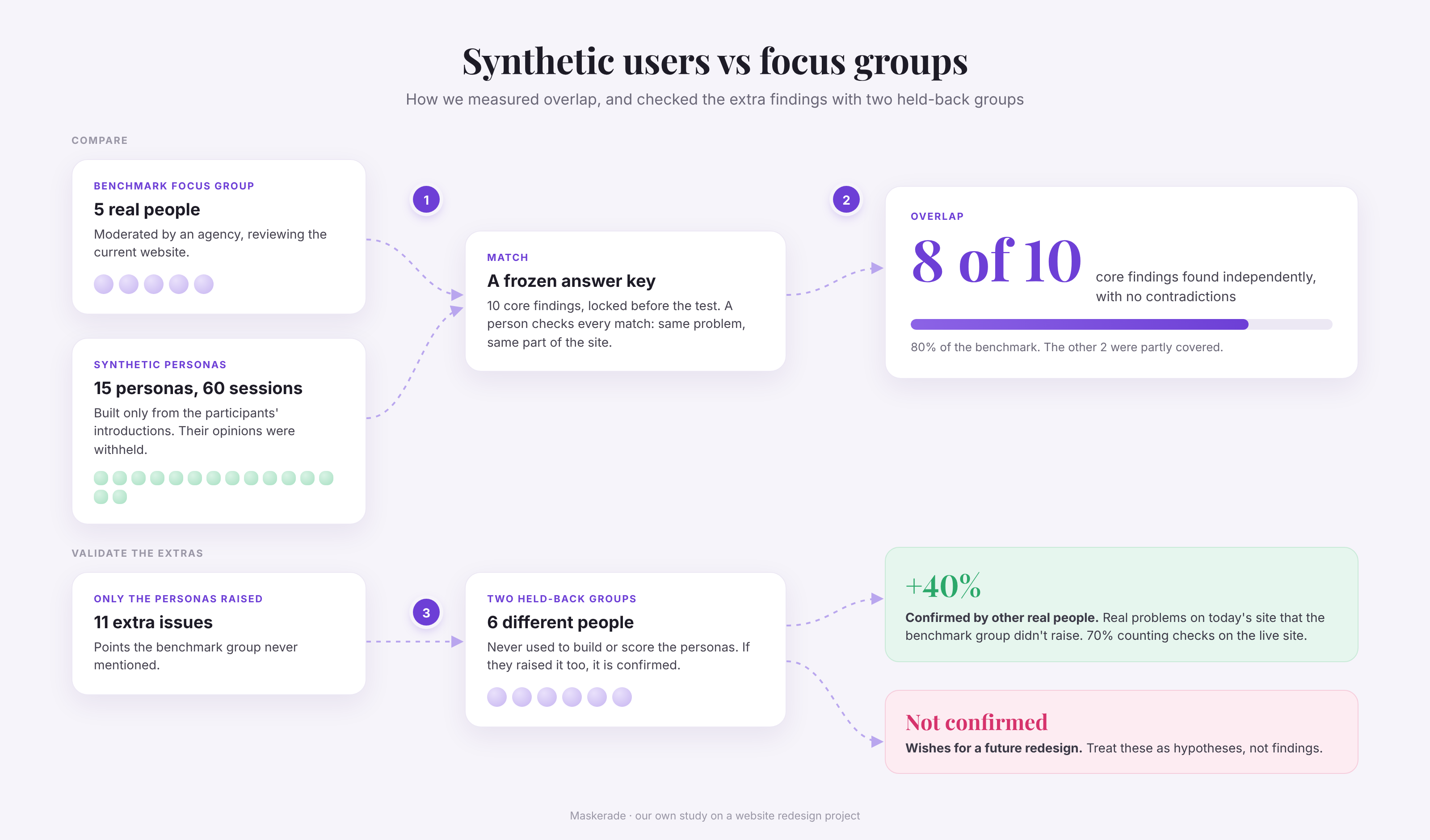
How accurate are synthetic users? Our focus group study
We compared synthetic users with three moderated focus groups on a website redesign. They found 80% of the core findings, plus 40% more that held up.