Synthetic users: 13 best practices from real customer projects
Synthetic users are AI personas that browse your live website like real customers and tell you where they get stuck. They work best when you build them from your own research, keep one shared core set, give them loosely defined tasks, and let people with business context decide what ships. Here are 13 practices from the customer projects we've worked on in the past 6 months.

On this page
In short
- Build personas from your own research and start every test from one shared core set.
- Change one attribute at a time, so results stay comparable.
- Give a clear task, not a script, and do a small sample run first.
- In our own study, synthetic users found 80% of a moderated focus group's core findings, with no contradictions, plus 40% more that other real people confirmed.
- People with business context decide what ships.
First, what are synthetic users?
Synthetic users for website testing are AI agents, each briefed as one of your customer personas, that open your site in a real browser, click, scroll and think out loud. You get their path, their quotes and a ranked list of friction points, often within minutes.
They are not the same as synthetic monitoring. Synthetic monitoring runs scripted bots to check that a page loads and a checkout works. Synthetic users judge whether a real person would understand the page, trust it and convert.
They also differ from AI survey tools. Most synthetic research tools simulate interview answers. Synthetic users act on your actual pages, so their feedback is tied to what they saw on screen, with a screenshot and a session replay for every finding.
For the full introduction, see our guide to synthetic users for website testing.
How reliable are synthetic users?
In our own study, synthetic users found 8 of the 10 core findings (80%) of a moderated focus group, with no contradictions, plus 40% more. Two other focus groups, never used to build the personas, confirmed those extras.
The extras that weren't confirmed were about the future, the wishes people have for a redesign, not about the site as it is today. We explain how we measured this in our accuracy study, and how we build the personas in How we build synthetic users, and the research behind it.
Critics, including a 2026 NN/g study, warn that synthetic respondents drift toward average answers. That risk is real for personas built from nothing. It shrinks when personas come from your own research and act on real pages, which is what most of the practices below are about.
Personas: build them once, build them well
The quality of your personas sets the quality of your findings. As one customer put it: "Like every AI, the input defines the quality of the output."
This is also known as "garbage in, garbage out".
1. Build personas from what you already have
You don't need a new persona project first.
Most companies have a description of their ideal customer or their personas lying around, and that is a good basis. If you also have interviews, segmentation studies, NPS, survey data or customer verbatims, even better: Maskerade can work with all of them.
A top European telco gave us 34 existing sources, and we turned them into 35 personas, each trait traceable to its source. MIRON simply handed over the 5 buyer personas it had built for its website project.
And if all you have is your URL, but your website describes your value proposition well, you can start from there: Maskerade guides you step by step so your personas are accurate and well built. Richer input still pays off: AI agents built from in-depth interviews predict people's answers far better than agents built from demographics alone (Park et al., 2024).
2. Change one dial at a time with persona variants
When a journey needs a specific profile, copy one of your personas and change one attribute instead of building a new one. A luxury beauty brand did this to compare new prospects with loyal customers. The same personas were briefed twice, once as first-time visitors and once as returning buyers with a favorite product. Because only the situation changed, the differences between the two groups were real differences, not noise.
Variants also give you volume. Because personas find their own way through the site, a handful of them only covers a handful of paths. Run at least 20 personas per test, with at least 6 variations of each segment, so every segment gets enough sessions to show a pattern rather than one person's opinion. Too few, one-dimensional personas also drift into caricature (Cheng, Piccardi and Yang, 2023).
3. Start every test from one shared core set of personas
Agree on a fixed set of personas that represents your typical customer, and start every test from it. If each team builds its own, results drift and you can no longer compare one test with the next. A UX lead at a top European telco set up a core set of 18 company personas for exactly this reason: "We need to create consistency, because that's the most important thing."
4. Reuse and organize your persona library
Organize personas by country, segment and role, and reuse them across runs rather than creating new ones each time. A digital reading platform in francophone Africa built a library of 182 personas in 39 segments across 20 countries and reused it for months of testing. A clean library is what makes results comparable over time.
Test every market with personas from that market, in its own language and culture. They catch more than untranslated text: they also judge whether examples, imagery, prices, payment options and tone feel right where they live. An Italian persona found that MIRON's chat was still in English, and a Kenyan persona hit a language issue on the reading platform.
Tasks: how to set up a good test
The task tells personas where to go and what to pay attention to. It should not tell them what to think. Keep it to one journey, try it on a few personas first, and give them an account that looks real.
5. Give a clear task, then let personas find their own way
Describe the goal, such as "find a plan that fits your household and sign up", and leave the route open. The reading platform found that light instructions worked better than step-by-step lists. Unguided personas show you where real people would get confused, which a scripted path hides.
Wording matters less than you would think, because Maskerade rewrites each task into a clear brief and asks back when something is missing. If you want personas to focus on something specific, like a brand attribute or a step in the funnel, add it to the task on purpose.
6. Start with one journey
Pick one journey, like a sign-up or a plan change, instead of the whole site. ENGIE started narrow and only then widened the scope. MIRON's advice is the same in spirit: "You don't need a huge research project to start getting value from it."
7. Do a small sample run before the big one
Send a few personas through first. If the site has a bug or a login wall, you find out before 30 sessions run into it. The reading platform started doing this after a site bug showed up halfway through a run.
8. Use realistic test accounts for logged-in journeys
Personas react to what they see, so the account has to look like a real customer's. An account with dozens of unpaid bills creates findings no real customer would ever have. We found this out the hard way at a service provider we worked with, where the personas were frightened by all the unpaid bills on the test account that nobody bothered to remove before.
Scaling: make every test repeatable
The first run is for learning. The tenth is where the value compounds.
9. Re-test with the same personas after every change
A test is not a one-off. Fix what the personas found, then send the same personas through again. Because the personas didn't change, any difference comes from your site, so you can see whether a fix actually worked before it goes live. Decide upfront what "done" looks like, for example no blockers left in the checkout, so the loop has a clear end.
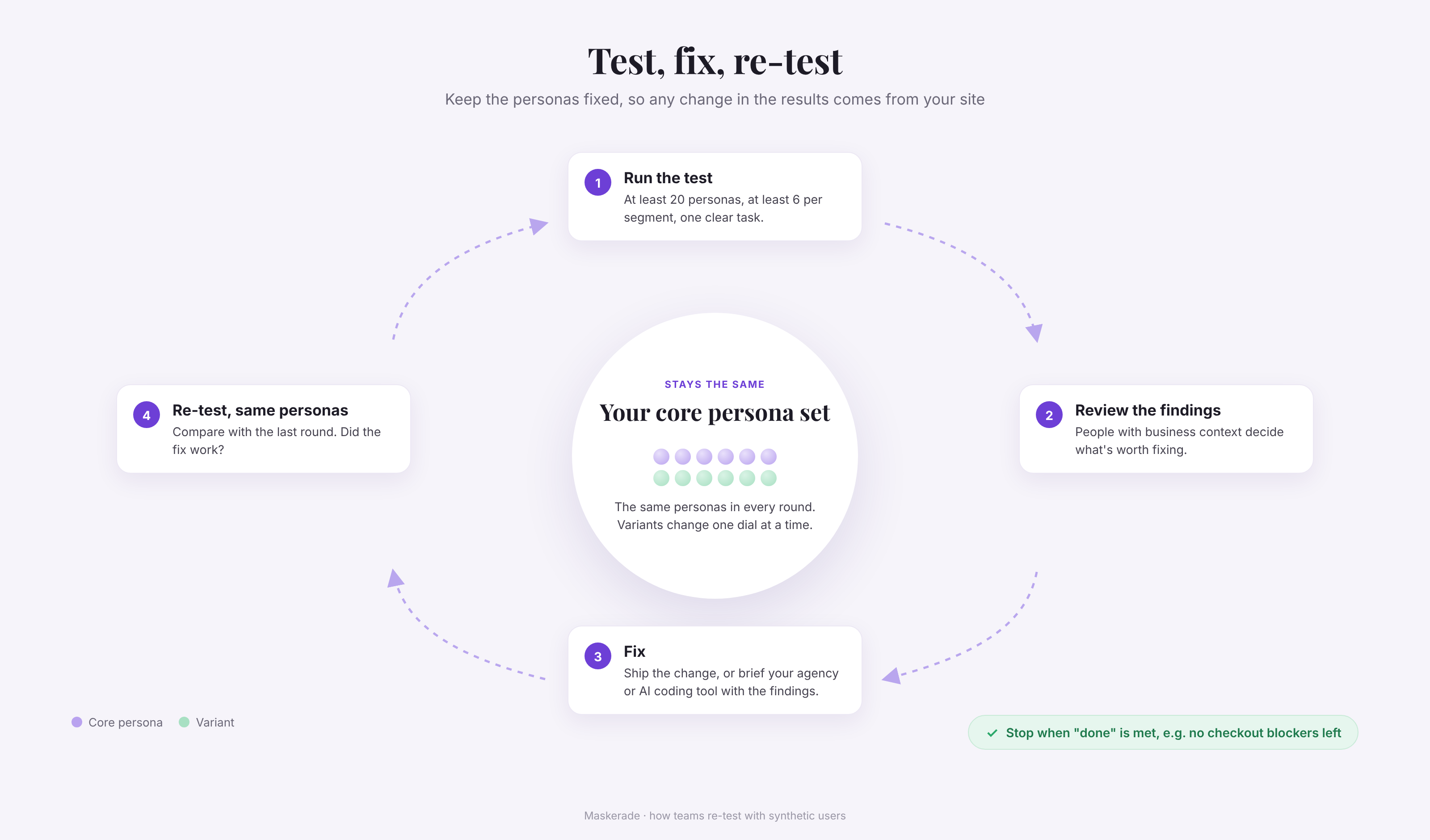
10. Configure a repeat test once, then schedule it
For tests you run often, such as a checkout check or a contract change, set up the test once: the personas, the task and the start page. Then schedule it, for example weekly or after every release. The same personas and task are reused each time, so results stay consistent and comparable, and nobody has to rebuild the test.
From findings to action: humans decide
Synthetic users widen the funnel of ideas. People with business knowledge decide what goes through.
11. Let people with business context filter the findings, and pair CRO with UX
Personas experience your site like a customer, but they don't know your regulations, your technical limits or what you tried last year. ENGIE's team, which works in a complicated regulated environment, reviewed 42 recommendations closely. They implemented 9 right away, sent 20 to further research and A/B testing, and set the rest aside with good reason. It helps to pair CRO and UX in the same team, as ENGIE did: CRO runs the analysis, UX makes the fixes.
12. Plug findings into your workflow, AI tools included
Findings only pay off when they land where work already happens. At MIRON, the Head of Marketing turned findings into development tickets for the web agency. The reading platform's product lead puts the "if you do three things" summary on top of every results page and ties each test to an item on the product roadmap.
If your team already works with AI tools, connect them directly. Maskerade's MCP server lets an AI assistant pull personas, findings and reports into the tools you already use, and push them on into tickets, docs or reviews without copy-pasting. A UX lead at a top European telco is exploring exactly this to run journey reviews from the team's own AI workflow.
No roadmap, but building with AI coding tools? Then the findings are your input. Paste the persona feedback straight into your vibe coding platform as the brief for the next iteration, and test the result again with the same personas.
13. Let every team test, not just one
Don't keep Maskerade to one team. Each business unit has its own ideas to test, and shared personas give everyone the same view of the customer. The reading platform gives its B2B, editorial and marketing teams access too, so each team tests its own ideas against the same readers.
Caveat: Where synthetic users fall short
Synthetic users are good at pre-testing, at repeat testing and at generating hypotheses. They can sit before you talk to real users or run an A/B test. They can also stand in when there is no time to talk to real users, as a substitute, but there are caveats to take into account:
- They are weakest on future wishes. In our study, the extra insights that weren't confirmed were about what people want from a redesign, not about the current site.
- They don't know your business. Regulation, technical limits and past experiments are context only your team has (practice 11).
- Some sites block them. Heavy bot protection can stop a browsing agent, so check access before a big run. We have ways to support you if this is an issue for you, so don't hesitate to reach out.
Thanks for reading. If you remember one thing: your synthetic users are only as good as the research you build them from.
Elias Veris, co-founderTry it on your own site
Maskerade runs AI personas that browse your website like real customers and tell you where they get stuck. Pick your personas, give them a task on your own site, and read their report about 5 minutes later.
Frequently asked questions
How many synthetic users do I need per test?
At least 20 per run, and at least 6 per segment. Personas find their own way through the site, so you need volume to cover different journeys and paths, even when you know what you're looking for. We get there by making variations of your existing persona segments.
Can synthetic users test logged-in pages?
Yes, with dedicated test accounts that look like real customers' accounts.
Do I need personas before I start?
No. Personas can be built from the research you already have, inferred from your website, or from a short description of your customers.
Are synthetic users the same as digital twins?
The terms overlap. Here, both mean AI personas built from your customer data that act on your real website.
Keep reading
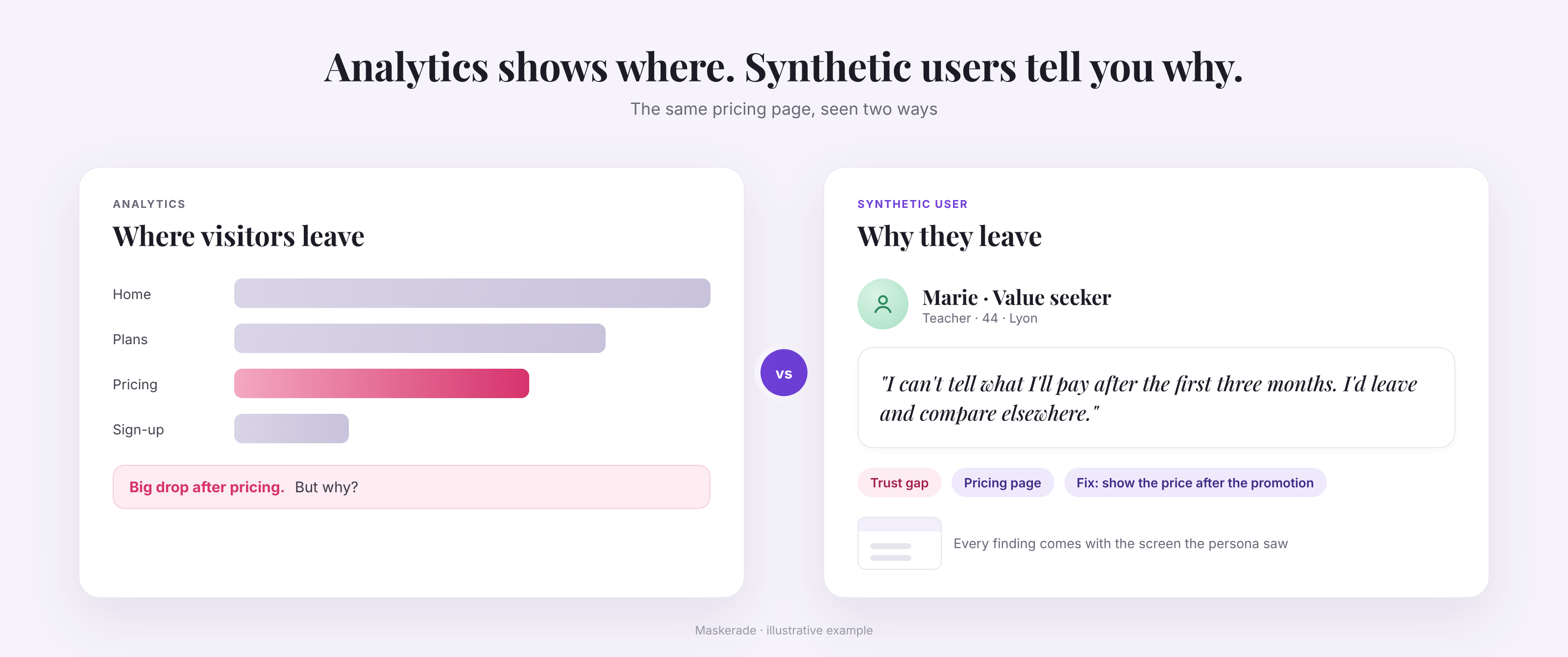
Synthetic users for website testing: how AI personas find what your analytics miss
Synthetic users are AI personas that browse your website like real customers. What they find that analytics miss, when to use them and how accurate they are.
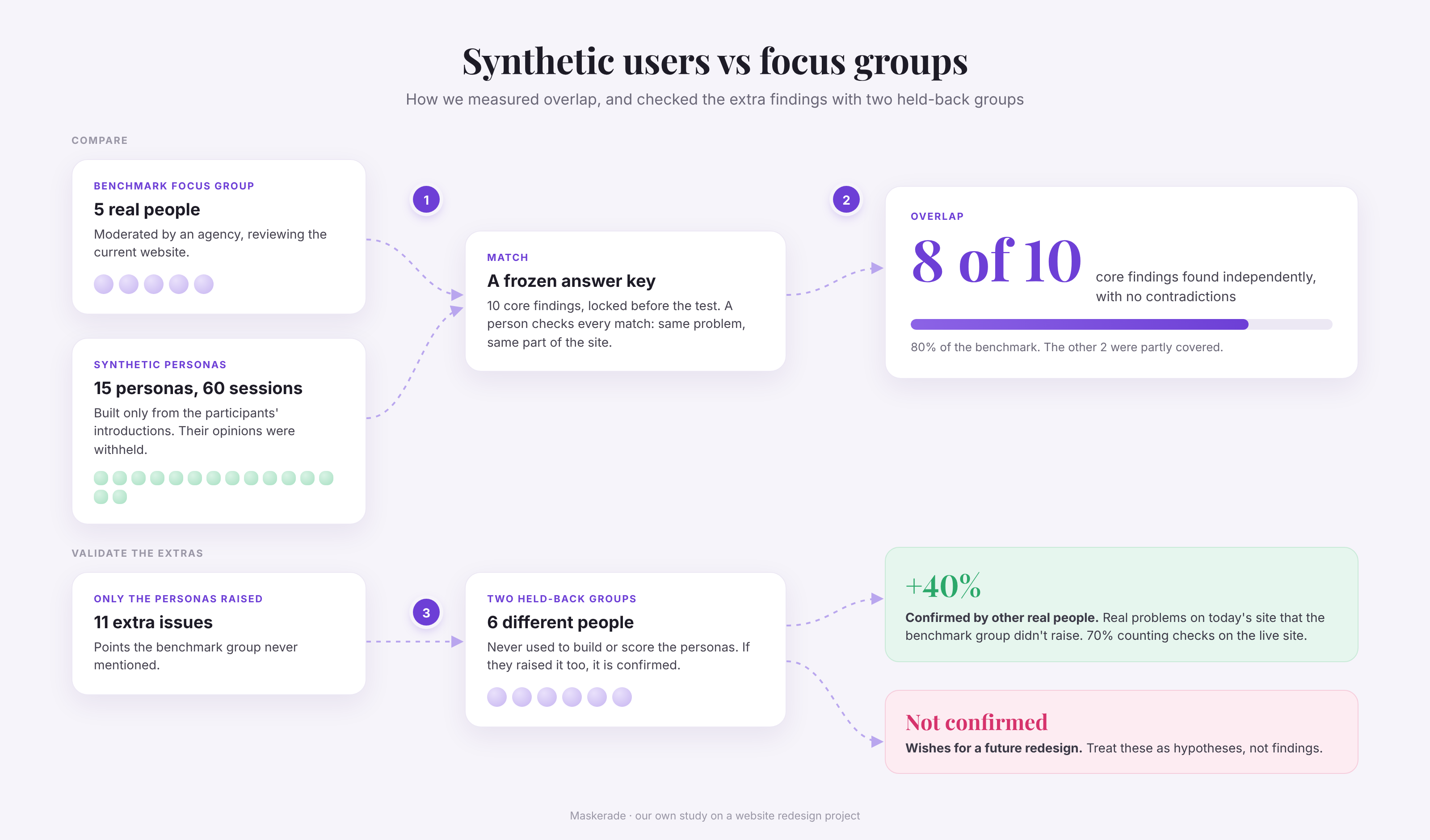
How accurate are synthetic users? Our focus group study
We compared synthetic users with three moderated focus groups on a website redesign. They found 80% of the core findings, plus 40% more that held up.
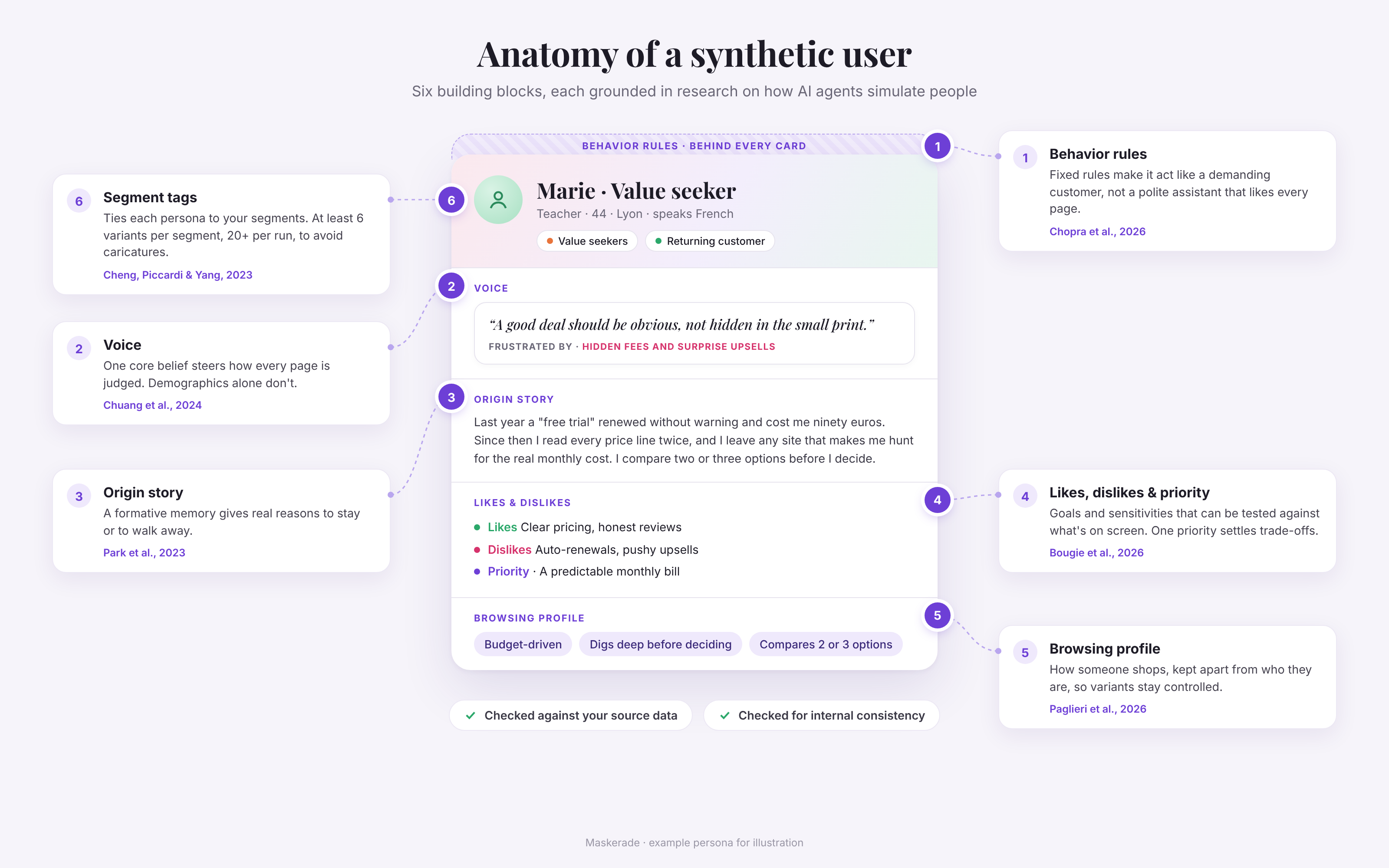
How we build synthetic users, and the research behind it
How to create synthetic personas that act like real customers: the six building blocks of a Maskerade AI persona, and the research behind each one.